
Friday, January 6, 2012
This summary is not available. Please
click here to view the post.
 The new Diamond standard for casual puzzle action.
The new diamond standard for casual puzzle action - Diamond Twister 2 brings all the gem-swapping fun back with 10 unique gameplay mechanics, power-ups and a story set in the jet-set world.
Contact us at android.support@gameloft.com for any problems you may have with this application.




This summary is not available. Please
click here to view the post.
This summary is not available. Please
click here to view the post.
This summary is not available. Please
click here to view the post.
 As we become more dependent on the internet to keep us connected to the things that are important to us, considerations must be made for the safety of ourselves, our passengers and those sharing the road. If you can’t bear to be disconnected during a long commute, here are a few tips for using the internet safely while in the car.
- Pull Over – The simplest way to keep in-car internet use safe is to pull over. Many automakers are rolling out web-browsing capability in their newest models, but most of the more distracting features are only available when the vehicle is in park.
- There’s An App For That – Mobile connectivity is always at the tips of your fingers with an iPhone or Android powered smartphone, and most of these phones have apps available that keep internet use safe while driving. Apps that allow the user to compose text messages, Facebook status updates and tweets via speech-recognition technology make it easy and safe to stay connected on the go.
- In-Dash Systems – An in-dash internet system is predicted to be a standard feature in new vehicles within the next five years. These fully integrated systems come equipped with safety features that make choosing a restaurant while at a stop-light or finding the nearest gas station a breeze.
- Carpool – In addition to being an earth-friendly choice, carpooling allows passengers to safely use in-car connectivity to their hearts’ content while the driver focuses on the road.
- Listening To Internet Radio – Scanning internet radio stations offers a huge selection of music at the tap of a screen. No more dangerous than using a traditional radio while driving, the world of music is opened up with online radio.
- Online Navigation Systems – Navigation and GPS systems that run on a broadband signal rather than a satellite one can be more accurate, which actually boosts the safety of using these devices. More accidents may be avoided by eliminating slow or inaccurate flow of navigation information.
- Driver’s Assistance Tools – Web-based warning systems can alert drivers to traffic problems and other driving hazards ahead audibly, eliminating the need for hands-on browsing and increasing safety.
- Weather Updates – In addition to navigation and traffic hazard alerts, there are applications available for in-car use that warn of severe weather along an itinerary audibly. These features are especially useful for long roadtrips where drivers may encounter several changes in weather along the route.
- Text-To-Speech Email – Drivers anxiously awaiting an important email can now have incoming messages read to them through in-dash systems or an enabled smartphone. Instead of scrambling with a phone and taking your eyes of the road, you’ll be able to stay on top of your inbox without taking your hands off of the wheel.
- Smartphone Linking Systems – Systems that link the in-car computer with a smartphone via wireless network bring all of the bells and whistles of your phone to the dash, making it a snap to safely access stored music and compose messages through speech recognition.
However you choose to stay connected in the car, be sure to adhere to all local laws regarding phone/device usage while in motion and to restrict all use in hazardous conditions. Even the safest systems can be a distraction, especially in inclement weather or in construction zones.
This is a Guest Post By Coleen Torres Who Workes At http://www.phonetvinternet.com
This summary is not available. Please
click here to view the post.
 CPU Maseter: More Power
CPU Master Pro is AnTuTu Pro App!
AnTutu CPU Master is a tool for changing the CPU speed (capable of overclock and underclock) on a rooted android devices to improve performance or save battery.
Automatic detection CPU's available frequencys, don't need to manually choose.
CPU Master's widget show the CPU and battery stats, and change the CPU speed faster and simple.


CPU Master also allows you to set up profiles to change the CPU speed under certain conditions, such as when the phone is asleep or charging, when the battery level drops below a certain point, or when the phone's temperature is too high.
Note: Root is necessary
Easy to find the following brands HTC,Motorola,Samsung,Google,LG ROOT
CPU Master Similar:setcpu, OverclockWidget,Milestone overclock
v2.0
- Supports x86 and MIPS platforms.
- Add a CPU frequency only 1x1 widget.
- Add CPU Voltage control for Optimus 2X custom kernel.
- Enhance battery temperature and level detection.
- Fixed default governor incorrect bug.
- Supports x86 and MIPS platforms.
- Add a CPU frequency only 1x1 widget.
- Add CPU Voltage control for Optimus 2X custom kernel.
- Enhance battery temperature and level detection.
- Fixed default governor incorrect bug.
Download Links:
Filepost Download Links:
http://filepost.com/files/cd1446ed/AnTuTu_CPU_M_v2.3.1.1.apk/
Filepost Download Links:
http://filepost.com/files/cd1446ed/AnTuTu_CPU_M_v2.3.1.1.apk/
 PowerMax - maximize your battery life!
PowerMax extends the battery life of your mobile device. Simple to use: just push the button.
PowerMax is a mobile application that will help you extend the battery life of your mobile device. When you're on the go and notice that your mobile is about to die, or if you know it's going to be a long day until your next chance to charge, one touch activates PowerMax. PowerMax will save your battery and better manage power usage for you.
PowerMax is one of the most friendly and simple to use applications available today. On the main screen there is an On/Off switch. By clicking switch on, the Power Saver will be activated and save your battery, and by clicking off, PowerMax will restore your normal settings. When Power Saver Mode is on, your phone's functionality will be significantly reduced. But don't worry, this is just to save you power, you can always use your mobile's features on demand (email, internet applications etc).


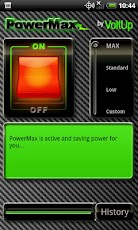

In testing we have seen a wide range of battery life improvement – from a mediocre 20% more to an impressive 100% – doubling battery life! Your device usage pattern has a direct affect on the savings – typically the more you use your device the higher the savings you will enjoy. Please note that our reports on the percent improvement in battery life will only start a few days after you install PowerMax. Why? Because PowerMax first learns what is your normal battery consumption, the baseline, and then calculates the improvement.
PowerMax can be downloaded for free then used for an evaluation period of one week. Once the evaluation period is over, PowerMax users who are not interested in purchasing a key can still continue using PowerMax in advertising supported mode. You can purchase a license key at any time to unlock the full functionality of the PowerMax.
** Please EMail us if you run into any problems! We can't help you if you post negative feedback here **
** Google Android Market has issues with paid downloads. Email us and we will help you. We can't respond to negative feedback placed on us for Google's problems... **
** PowerMax is SIMPLE. Compare it to Latedroid JuiceDefender or Green Power - so many confusing options to waste time learning about **
** PowerMax is CAPABLE. No other App can turn off GPS on recent Android devices. Compare it to One Touch battery saver **
Download Links:
Filepost Download Links:
http://filepost.com/files/74e52295/PowerMax_v1.7.2.apk/
http://filepost.com/files/cf49mmda/PowerMax_v1.7.apk/
This summary is not available. Please
click here to view the post.
This summary is not available. Please
click here to view the post.


Subscribe to:
Posts (Atom)
