
Showing posts with label Blogger Tricks. Show all posts
Showing posts with label Blogger Tricks. Show all posts
Friday, June 24, 2011
Most Of the blog doesn't have good styles and the owners Try there level best to get good styles but one of the main Styles How they can change the Post title Font Most Of The Blog doesn't Have Good Post Title fonts so we are here to tell you that how you can change your post title fonts in just a mints.Fonts Play Very Important Role As A Visitor Visit Your Site And He Saw Your Site In A Complete Mess He Or She Would Never visit Your site again so fonts Designing is important So Let Us Start Working

First Find
.post h2 a {
Then Under It You Will See the option you can also change the color of your post and can also change the font style
Changing Post Title Font Style
For example you want Aerial Font Then just Replace Impact With Aerial And Save Your Templete
font-family:impact;
font-family:impact;
Wednesday, June 15, 2011
How To Increase The Traffic To Your Website
But there are whole heaps of great advice, which if followed, will lead to more visitors to your site. What follows is a simple to follow list of best practices to help get you on your way.

1. On-Site Factors. Start with your site. You need to make it the best it can be. So that it will be attractive to visitors AND search engines.
- Keywords. What is your site about? Find a few key words and phrases that you think describe your site and that people may actually enter into a search box on Google. If you pick very popular keywords and phrases, you might be disappointed. Millions of people will search for those keywords and phrases, but you will be way down the search results because lots of sites are optimized for those phrases. If you pick less popular keywords and phrases, you may have a shot of actually showing up in the search results because fewer sites have optimized for those keywords and phrases.
- Optimize Your Site. Use your keywords and phrases on your site. Put them in the title of your page, in the H1 tags, metatags and throughout your site. Use them in the text of links that point to your page. Shoot for having keyword density of about 6%.
- Have Good Content. You should strive to have something new on your site once per day. Don't let your site get stale... Google's algorithms will notice and so will visitors to your site. If you don't have a lot of time to create unique content every day, consider putting up a daily poll, creating a forum on your site, or leaving a comments field/Guest Book for visitors to fill out. If you use Twitter or Facebook, you can have your updates automatically appear on your site.
- Unique Value Proposition. Give something away on your site to your visitors to remember you by. Otherwise people may forget your site and won't come back. You can find interesting content on widgetbox.com, or you can give them a custom Alexa Toolbar. Just give them something.
- Create A Sitemap. Every time you update content on your site you should update your sitemap and submit the site map to Google, Yahoo, Bing, Ask, etc.. There are lots of free sitemap tools out there. Find one and get started. It is a great way to let Google know when your site is updated.
- Return Visitors. How are you going to get people to return to your site after they have left? You may want to consider an e-mail newsletter. But don't spam... please. If people like your content let them sign up to get your newsletter. You should also allow people to subscribe to your updates via facebook or twitter. Most blogs offer easy plugins for this feature.
- Link Bait. People love lists. Make lists of things that are relevant to your site and put them on your site, like top ten fishing sites. Then let the sites in your list know you have made your list. They may take that list and put it on their site... Or give out awards like "fishing site of the week." which brings us to...
- Link Number One. The first link is easy. Alexa already has a link to your site, and Alexa's page rank is high, so the link from Alexa counts more than most. You just need to let Google know that Alexa has a link to your site. How do you do that? Install the Google Toolbar then visit Alexa. But be sure to put your Alexa Toolbar back!
- Get Listed In Directories. Directories that are relevant to your site are generally more important than others, so if your site is about basket weaving, find a basket weaving directory and ask them to list your site. Get listed in as many as possible. And then find other general directories like DMOZ and get listed there. Are there Wikipedia articles that should list your site as a place for more information on a topic? Get listed.
- Participate In Social Media. Find forums that are relevant to your content and participate... a lot. Update your signature footer on the forum to include a link to your site. Use Twitter, Facebook, Digg, but, in all cases, do not just post or write about your own site. Nobody cares. Write and post about things that you care about, sometimes your site, and people who like your posts may make their way over to your site.
- Have Something Newsworthy. If you have something newsworthy, don't just blog about it. First post it as a press release on your site, then update your sitemap, then post it to the newswires, then submit it to ezine articles, Article Base and/or Go Articles, then blog about it, twitter about it, etc. If you do it right you will have at least a couple of new links to your site, and if you do it really right you could have dozens of new links.
- Advertise. There are lots of great advertising solutions out there. Google AdWords is a great place to start and, if done well, can offer you a good deal on targeted traffic. Display advertising can be effective and affordable as well. The social networks are now offering do-it-yourself advertising at reasonable prices, and even Alexa allows you to advertise at inexpensive CPMs.
Getting more traffic to your site is a journey. Take the first steps today, and with a little hard work and some luck, you will be counting your visitors in the millions before too long.
Source :http://blog.alexa.com/2009/07/how-to-increase-traffic-to-your-website.html
Poker Hold'em
 Deep Link Directory
Sunday, June 12, 2011
How To Make Your Blogger's Blog Fully Working For Mobile Users Latest Trick 2011
Sunday, June 12, 2011 0
Hey Guys how are you all you all know that the power of internet is now easily access on mobile phones as well so why not we modify our templates so that users from mobile could also access our site most of you user have experienced that you could not visit your site from your mobile device because you have disabled this option so why not we enabled it so it will become easy for the mobile user to access your website from there mobile any time they want so lets not waste our time and lets started with the our job
 First of all go to blogger.com and sign in to your account now click on settings on your specific blog And then click on Email & Mobile
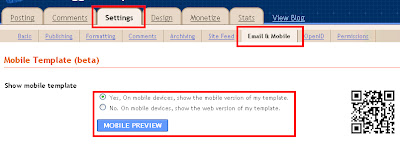
Now you all would notised that your blog is not on mobile because it is published as No so we will change it to Yes
And now your work is done you can easily acces your site from any mobile device if you want to check your website preview then click on Mobile preview on same page to view your website


Now you all would notised that your blog is not on mobile because it is published as No so we will change it to Yes
And now your work is done you can easily acces your site from any mobile device if you want to check your website preview then click on Mobile preview on same page to view your website
Disclaimer
Copy Right @ Biggest Games Tutorials If Any one Found Copying this Artical Could Have to surve the punishment it is copy right protectedThursday, June 9, 2011
Five Steps To Boost your Blogger's Blog Traffic Latest Trick 2011 Biggest Games Tutorials
Thursday, June 9, 2011 0
Hey Every One How are you all i hope you all would be fine.i could bet that you all have your own blogger account and a blog but did you ever noticed that your blog is not working and it is not working for adsense as well as traffic.still you are trying hard to make your blog more better and better but you are failed to do it now finally BIGGEST GAMES TUTORIALS have brought a life changing Artical which will not only make your blog more better for adsence and also for traffic and will also list your website on different search engine All You have to do is to follow the steps if you follow the steps correctly you will definitely Get a good blog as we are following the same method

Customize You Blogger Template
1.First of all you need to change your blog style.Most of the blog users are using the Same blog templeates provided by blogger on the start so change the templates all you have to do is to download a blogger templates i could recommand a website which have many great blogger templete http://btemplates.com/ .After downloading it go to Design>>>Edit Html>>>and Then Upload it there and Save it
Upload Quality Content And Keep Blogging
2.Now try To Upload some Quality Content Leave your habit of copying stuffs from the other websites and start writing blogs on Your own.Wright Some intrusting Articals with unique name so any one will search for it could redirect to your blog from search engine
Submit Site To Web directories
3.Start submitting your site to different but genuine directories and i am Giving Some Links So You don;t Need to Search For It http://www.submitdomainname.com/ Submit your site to 140 Directories
Sumbit Site To Free Traffic Exchange Directories

1.First of all you need to change your blog style.Most of the blog users are using the Same blog templeates provided by blogger on the start so change the templates all you have to do is to download a blogger templates i could recommand a website which have many great blogger templete http://btemplates.com/ .After downloading it go to Design>>>Edit Html>>>and Then Upload it there and Save it
Upload Quality Content And Keep Blogging
2.Now try To Upload some Quality Content Leave your habit of copying stuffs from the other websites and start writing blogs on Your own.Wright Some intrusting Articals with unique name so any one will search for it could redirect to your blog from search engine
3.Start submitting your site to different but genuine directories and i am Giving Some Links So You don;t Need to Search For It http://www.submitdomainname.com/ Submit your site to 140 Directories
http://www.learnweb101.com/Free-WebSite-Submission/ Submit Site To 100 Directories
Sumbit Site To Free Traffic Exchange Directories
4.Now You have to submit your sight to free traffic generating website will will not only give you page views but also increase your page rank and it will also give you every thing for free so no need to waste your money to buy and traffic here i will recommend you to use this free traffic generating site will will give you 10000 free views every day.

Publish Your Site On Social Networking Websites
Publish Your Site On Social Networking Websites
Try to post your links on different social networking websites it will not only give you free traffic but also increase your rank
Disclaimer
Copy Right @ Biggest Games Tutorials If Any one Found Copying this Artical Could Have to surve the punishment it is copy right protected

Subscribe to:
Posts (Atom)
