
Showing posts with label Personalization. Show all posts
Showing posts with label Personalization. Show all posts
Tuesday, July 3, 2012
Android Application

Recommended device requirements:
Requires Android : 2.1 and Up
Spend a warm summer day relaxing at your own private beach.
My Beach HD is an Editor’s Choice on Google Play!
Now with custom signs, custom airplane banners, automatic time of day based on location, Sunset, Dawn, Morning, Evening, Night time, fireworks, and more!
PERMISSIONS: Coarse location permissions are required in order to determine an approximate location for accurate sunrise / sunset times.
Saturday, June 30, 2012

Requirements: Android 2.0+
Overview: Transparency app is an transparent screen camera overlay in the front of all your apps which shows the background/behind camera scene and enables you to see through the transparent screen.
Friday, June 29, 2012
Android Application
Recommended device requirements:
Requires Android : 2.2 and up
Water Drops simulates water drops falling on your wallpaper. You can use the default pool tile background or customize the wallpaper. You can let the drops fall on it automatically, or tap to create new drops.
Features:
This wallpaper is like the free version, but with adjustable settings:
* Custom background
* Different reflection styles
* Quality/battery control
* Automatic drop rate adjustment
* Different drop sizes
* Selectable animation speed
* Zoom in on background
* Improved performance (3x faster)
* Multitouch
* Different reflection styles
* Quality/battery control
* Automatic drop rate adjustment
* Different drop sizes
* Selectable animation speed
* Zoom in on background
* Improved performance (3x faster)
* Multitouch

Sunday, June 24, 2012
Yang The Cat v1.0.6
Requirements: Android 2.1+
Overview: Yang The Cat is animated and interactive cat on your home screen!
You can comfort him, he purrs, meows and even sleeps! Change conditions from snowy to fireflies and customize Yang in many ways! Lots of options and accessories - hats, glasses, necklaces, eye colour and other details to change and combine. All art is original and handpainted!

Yang The Cat is animated and interactive cat on your home screen!
You can comfort him, he purrs, meows and even sleeps! Change conditions from snowy to fireflies and customize Yang in many ways! Lots of options and accessories - hats, glasses, necklaces, eye colour and other details to change and combine. All art is original and handpainted!
Requirements: Android 2.1+
Overview: Yang The Cat is animated and interactive cat on your home screen!
You can comfort him, he purrs, meows and even sleeps! Change conditions from snowy to fireflies and customize Yang in many ways! Lots of options and accessories - hats, glasses, necklaces, eye colour and other details to change and combine. All art is original and handpainted!
Yang The Cat is animated and interactive cat on your home screen!
You can comfort him, he purrs, meows and even sleeps! Change conditions from snowy to fireflies and customize Yang in many ways! Lots of options and accessories - hats, glasses, necklaces, eye colour and other details to change and combine. All art is original and handpainted!
Android Application

Recommended Device Requirements:
Requires Android : 2.0 and up
What’s in this version Cube Theme 4 Go Launcher Ex 2.5:
Added new Icons.
More icons now change automatically (GalaxyS3 Ready)
More icons now change automatically (GalaxyS3 Ready)
Cube Theme 4 Go Launcher Ex 2.5,
Cube theme 4 GO Launcher EX is available now! Designed by White Eye Design! Over 500 New Cube Style icons, Over 385 of them change automatically, 6 new wallpaper, new folder interface and app drawer. Download this theme and have a completely new style of your android phone.
Android Application

Recommended device requirements:
Requires Android : 2.1 and up
TSF Shell 3D is an interface with brand new operating system.
Enable you to freely personalize various widgets to a full range. Let’s say goodbye to the traditional operation system.
Enable you to freely personalize various widgets to a full range. Let’s say goodbye to the traditional operation system.
Tuesday, June 19, 2012
Tell Me The Time v0.99
Requirements: Android 2.3+
Overview: tells you the time through your speaker/headphones then shuts itself off.
Nothing more, nothing less.

Tells you the time through your speaker/headphones then shuts itself off.
Nothing more, nothing less.
Works perfectly together with apps such as "Tasker", "Jays headset" and the likes.
Supported Languages:
Requirements: Android 2.3+
Overview: tells you the time through your speaker/headphones then shuts itself off.
Nothing more, nothing less.
Tells you the time through your speaker/headphones then shuts itself off.
Nothing more, nothing less.
Works perfectly together with apps such as "Tasker", "Jays headset" and the likes.
Supported Languages:
Tagy Unlocker v1.7.1
Requirements: Android 2.2+
Overview: Tagy: Gather your apps, bookmarks, contacts and settings into tag clouds.
Tagy is a set of widgets that will organize your apps, bookmarks, contacts and settings into tag clouds on your home screen. Tagy presents icon-free interface for those who love minimalistic text design and want a new look for their Android.

Tagy: Gather your apps, bookmarks, contacts and settings into tag clouds.
Tagy is a set of widgets that will organize your apps, bookmarks, contacts and settings into tag clouds on your home screen. Tagy presents icon-free interface for those who love minimalistic text design and want a new look for their Android.
Requirements: Android 2.2+
Overview: Tagy: Gather your apps, bookmarks, contacts and settings into tag clouds.
Tagy is a set of widgets that will organize your apps, bookmarks, contacts and settings into tag clouds on your home screen. Tagy presents icon-free interface for those who love minimalistic text design and want a new look for their Android.
Tagy: Gather your apps, bookmarks, contacts and settings into tag clouds.
Tagy is a set of widgets that will organize your apps, bookmarks, contacts and settings into tag clouds on your home screen. Tagy presents icon-free interface for those who love minimalistic text design and want a new look for their Android.
Thursday, May 31, 2012
Android Application

Recommended device requirements:
Requires Android : 2.2 and up
ReLaunch automatically categorises your apps into 9 unique categories and provides an elegant yet simple launcher that can be accessed from anywhere with a single swipe.
ReLaunch does not replace your existing home launcher but merely complements
Friday, May 18, 2012
Android Application

Recommended device requirements:
Requires Android : 2.1 and up
Ultimate Call Screen HD: Fullscreen Caller ID. Call Blocker and Sensor actions!
Ultimate Call Screen HD Pro License
This is the license to unlock all features of Ultimate Call Screen HD Free version. Note that this app is the license only, you need to install Ultimate Call Screen HD Free, and all features will then be unlocked on that app. This app does nothing by itself!
With the Pro License you are also able to:
- Intercept and show SMS messages with fullscreen caller picture below. Fully themable SMS screen.
Wednesday, May 16, 2012
Android Application

Recommended device requirements:
Requires Android : 4.0 and up
Powerful, fast, and highly customizable home replacement for Android 4.0+.
Apex Launcher helps you create a customized homescreen experience on your Ice Cream Sandwich (Android 4.0) device.
Apex Launcher helps you create a customized homescreen experience on your Ice Cream Sandwich (Android 4.0) device.
Sunday, February 12, 2012
 |
| Freeware |
This application is a launcher supporting a variety of styles for shortcuts so that you can create a great mobile screen like a magazine cover page. For more wonderful screen, you can add some fancy font files(.ttf) and apply it to shortcut texts. Save your nice work to a file and share it with your friends!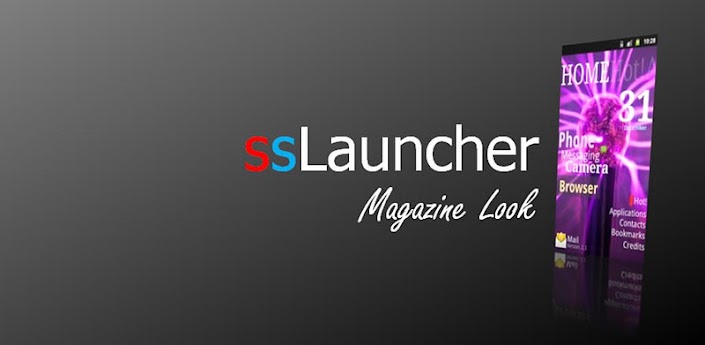
* Features
- Decorate screen with a variety of styles for shortcuts and widgets.
- Easy and quick access to pages for contacts, bookmarks, application drawer, application group.
- Easy and quick access to pages for contacts, bookmarks, application drawer, application group.
Thursday, February 9, 2012
 |
| 1.31$ |
Ripple Lock has plenty of setting options: font color, font size, background, and so on.
Drag the inside circle to the outside circle can unlock screen.
This program will continuously update and add more colorful lock screen. Please suggestions to me at any time.
Screenshots:


Download From Android Market
Download From QR CODE:
- Open your QR barcode scanner application on your phone.
- Point your phone's camera at the barcode above and scan it.
- Follow the onscreen instructions and "tTorrent Pro v0.9.3" will be installed on your smartphone.
- Like it or hate it!.If You donot Have QR Barcode Scanner Download it from here

 |
| Freeware |
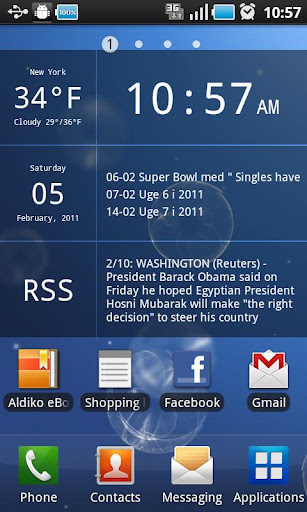
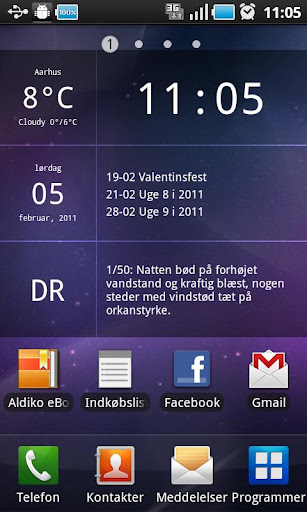
They are designed to provide you with the most important information at a glance, yet still allow you to enjoy the sight of your (Live-) wallpaper.
This package contains:
* Glass Clock Widget
Enter a city name, or use geolocation to automatically find your location. Add more than one clock widget to your home screen in order to follow the time and weather around the world.
Enter a city name, or use geolocation to automatically find your location. Add more than one clock widget to your home screen in order to follow the time and weather around the world.
* Glass Calendar Widget
See the current date, along with the next three events in your calendar.
See the current date, along with the next three events in your calendar.
* Glass News Widget
Read your favorite RSS/Atom feeds from your home screen. Select one of the build in feeds (BBC, Reuters, WIRED ect.) or add your own custom feed.
Read your favorite RSS/Atom feeds from your home screen. Select one of the build in feeds (BBC, Reuters, WIRED ect.) or add your own custom feed.
* Glass All-In-One Widget
All the above widgets combined into one big 4x3 widget. This is for those of you on platforms where the three separate widgets don't line up properly.
All the above widgets combined into one big 4x3 widget. This is for those of you on platforms where the three separate widgets don't line up properly.
FREE & PAID VERSIONS:
All the widgets are semi-transparent, with a nice smoked glass look. But the paid version will allow you to change the tint and transparency of the background as you wish.
FAQ:
1) I can't find the widgets
The widgets don't show up in the App-drawer. Instead, they can be found in the widget list. In Android 2.x/3.x the widget list is opened by tapping and holding on an empty space on the home screen. In Android 4.x (ICS) they can be found in the widget-drawer, which is located on its own tab in the app-drawer.
The widgets don't show up in the App-drawer. Instead, they can be found in the widget list. In Android 2.x/3.x the widget list is opened by tapping and holding on an empty space on the home screen. In Android 4.x (ICS) they can be found in the widget-drawer, which is located on its own tab in the app-drawer.
2) I still can't find the widgets
The most common cause of this problem is that the widgets are installed on the SD-card. Android doesn't like widgets on the SD-card. Please try to move them back to the main memory of the phone/tablet.
The most common cause of this problem is that the widgets are installed on the SD-card. Android doesn't like widgets on the SD-card. Please try to move them back to the main memory of the phone/tablet.
3) The widgets just aren't there!
A few users running Android 3.2 have reported a bug, where they get the error message 'No more room on this home screen' during the installation of the widgets. The installation seems to work regardless, but the widgets still doesn't appear in the widget-drawer. There are two possible workarounds for this problem: a) Start the Android Market App and open the market settings by clicking the button in the upper right corner. Then disable the 'auto add shortcuts' option. Note: this option is in the settings for the market app, not the general phone/tablet settings. b) Reboot the phone/tablet before installing the widgets.
A few users running Android 3.2 have reported a bug, where they get the error message 'No more room on this home screen' during the installation of the widgets. The installation seems to work regardless, but the widgets still doesn't appear in the widget-drawer. There are two possible workarounds for this problem: a) Start the Android Market App and open the market settings by clicking the button in the upper right corner. Then disable the 'auto add shortcuts' option. Note: this option is in the settings for the market app, not the general phone/tablet settings. b) Reboot the phone/tablet before installing the widgets.
Enjoy!
Screenshots:
Download From Android Market
Download From EverFreeTech
Download From QR CODE:
- Open your QR barcode scanner application on your phone.
- Point your phone's camera at the barcode above and scan it.
- Follow the onscreen instructions and "Glass Widgets v1.8.1 " will be installed on your smartphone.
- Like it or hate it!.If You donot Have QR Barcode Scanner Download it from here


Subscribe to:
Posts (Atom)
